背景與痛點
Google Maps 的地點清單(List)沒有內建匯出功能。如果想把收藏的餐廳整理成試算表進行篩選(例如依據價格、評分),只能手動複製貼上。
此外,Google Maps 使用了虛擬捲動 (Virtual Scrolling) 技術,若直接抓取 DOM 元素,只能抓到當前螢幕顯示的幾筆,上面的資料會被移除。且 Class 名稱(如 MW4etd)經常變動,導致爬蟲失效。
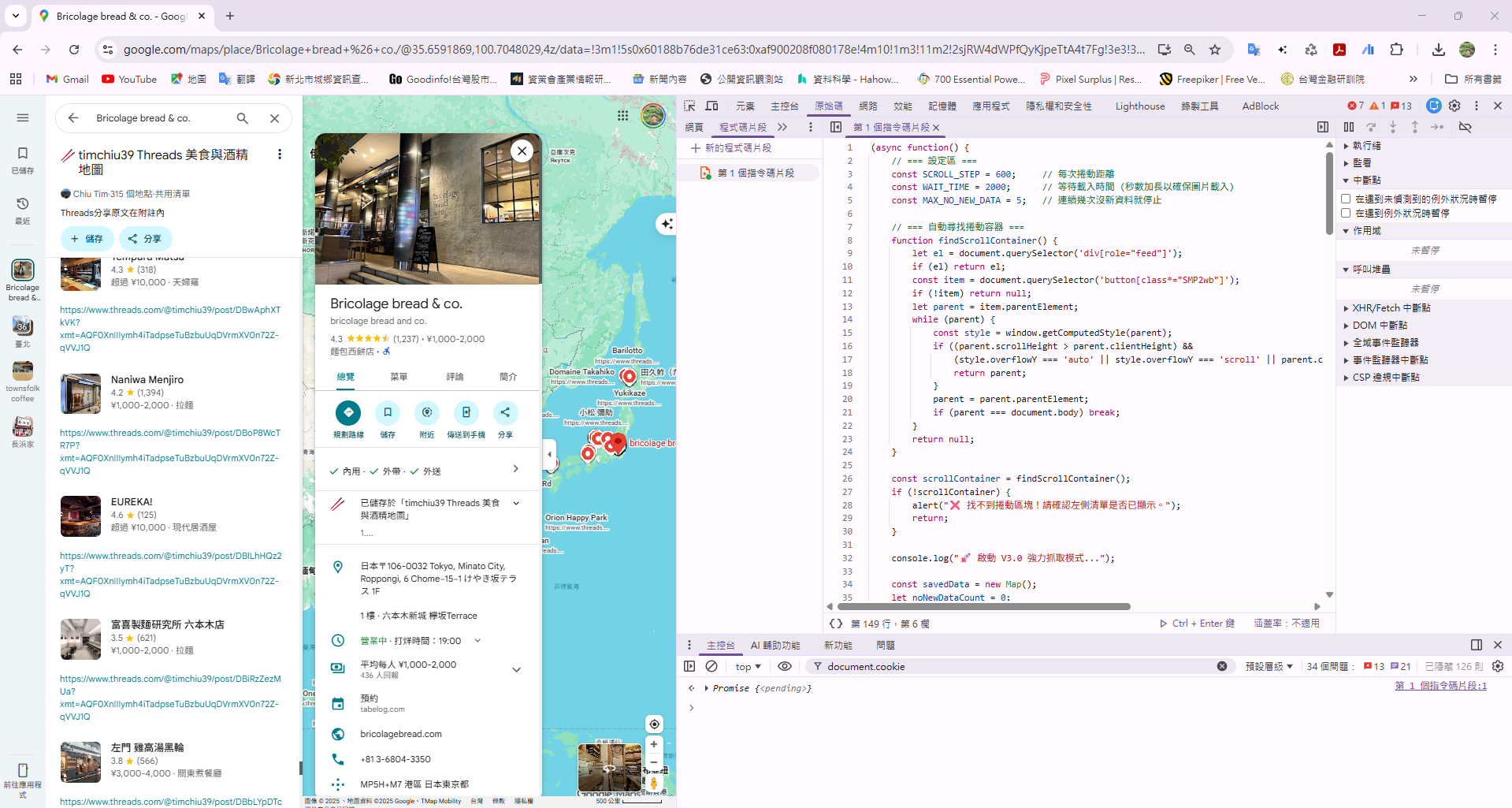
解決方案
這是一支 JavaScript Snippet,直接在 Chrome 開發者工具執行。它具備以下功能:
- 自動捲動:模擬使用者行為往下滑,觸發資料載入。
- 邊捲邊抓:使用
Map資料結構儲存,解決虛擬捲動導致元素消失的問題。 - 強健解析:改用
aria-label抓取評分與評論數,不依賴隨機 CSS Class。 - 多國貨幣:支援日幣 (¥)、美金 ($)、歐元 (€) 等符號識別。
- 圖片備份:同時偵測
img src與background-image。
程式碼 (V3.0 穩定版)
將以下程式碼貼入 Chrome DevTools 的 Sources > Snippets 中儲存,或直接在 Console 執行。
(async function() {
    // === 設定區 ===
    const SCROLL_STEP = 600;     // 每次捲動距離
    const WAIT_TIME = 2000;      // 等待載入時間 (秒數加長以確保圖片載入)
    const MAX_NO_NEW_DATA = 5;   // 連續幾次沒新資料就停止

    // === 自動尋找捲動容器 ===
    function findScrollContainer() {
        let el = document.querySelector('div[role="feed"]');
        if (el) return el;
        const item = document.querySelector('button[class*="SMP2wb"]');
        if (!item) return null;
        let parent = item.parentElement;
        while (parent) {
            const style = window.getComputedStyle(parent);
            if ((parent.scrollHeight > parent.clientHeight) &&
                (style.overflowY === 'auto' || style.overflowY === 'scroll' || parent.classList.contains('m6QErb'))) {
                return parent;
            }
            parent = parent.parentElement;
            if (parent === document.body) break;
        }
        return null;
    }

    const scrollContainer = findScrollContainer();
    if (!scrollContainer) {
        alert("❌ 找不到捲動區塊!請確認左側清單是否已顯示。");
        return;
    }

    console.log("🚀 啟動 V3.1 強力抓取模式 (已修復價格逗號問題)...");

    const savedData = new Map();
    let noNewDataCount = 0;
    let previousScrollTop = -1;

    // === 主迴圈 ===
    while (true) {
        const items = document.querySelectorAll('button[class*="SMP2wb"]');

        items.forEach(item => {
            try {
                // 1. 店名 (最穩定的錨點)
                const nameEl = item.querySelector('.fontHeadlineSmall');
                const name = nameEl ? nameEl.innerText.trim() : '未命名';

                // 只有新資料才處理
                if (!savedData.has(name) && name !== '未命名') {

                    // 2. 評價與評論數 (改用 aria-label 解析,最穩定)
                    let rating = '', reviews = '';
                    const ariaEl = item.querySelector('[aria-label*="星"], [aria-label*="stars"], [aria-label*="評論"], [aria-label*="reviews"]');

                    if (ariaEl) {
                        const label = ariaEl.getAttribute('aria-label');
                        const ratingMatch = label.match(/([\d\.]+)\s*(?:顆星|stars)/);
                        const reviewMatch = label.match(/([\d,]+)\s*(?:則評論|reviews)/);

                        if (ratingMatch) rating = ratingMatch[1];
                        if (reviewMatch) reviews = reviewMatch[1].replace(/,/g, '');
                    } else {
                        // 備用方案:舊式 Class
                        const ratingEl = item.querySelector('.MW4etd');
                        if (ratingEl) rating = ratingEl.innerText.trim();
                        const reviewEl = item.querySelector('.UY7F9');
                        if (reviewEl) reviews = reviewEl.innerText.replace(/[(),]/g, '').trim();
                    }

                    // 3. 圖片 (雙重偵測)
                    let imgUrl = '';
                    const imgEl = item.querySelector('img');
                    if (imgEl && imgEl.src && !imgEl.src.includes('data:image')) {
                        imgUrl = imgEl.src;
                    } else {
                        // 嘗試找背景圖
                        const bgDiv = item.querySelector('div[style*="background-image"]');
                        if (bgDiv) {
                            const style = bgDiv.getAttribute('style');
                            const match = style.match(/url\("?(.+?)"?\)/);
                            if (match) imgUrl = match[1];
                        }
                    }

                    // 4. 價格 (支援多國貨幣)
                    let price = '';
                    const allSpans = item.querySelectorAll('span');
                    for (let span of allSpans) {
                        const text = span.innerText;
                        if (/[¥$€£₩]/.test(text) || text.includes('NT$')) {
                            price = text.trim();
                            break;
                        }
                    }

                    // 存入 Map
                    savedData.set(name, {
                        name: `"${name}"`,     // 店名原本就有加引號
                        rating: rating,
                        reviews: reviews,
                        price: `"${price}"`,   // ★★★ 修正點:這裡加上引號保護價格 (例如 "¥1,000")
                        imgUrl: imgUrl
                    });
                }
            } catch (err) {
                // 忽略單筆錯誤
            }
        });

        console.log(`📦 目前收集: ${savedData.size} 筆 | 最新: ${Array.from(savedData.keys()).pop()}`);

        // 檢查是否到底
        if (Math.abs(scrollContainer.scrollTop - previousScrollTop) < 5) {
            noNewDataCount++;
            if (noNewDataCount >= MAX_NO_NEW_DATA) {
                console.log("✅ 判定已達底部。");
                break;
            }
        } else {
            noNewDataCount = 0;
            previousScrollTop = scrollContainer.scrollTop;
        }

        // 執行捲動
        scrollContainer.scrollBy(0, SCROLL_STEP);
        await new Promise(r => setTimeout(r, WAIT_TIME));
    }

    // === 匯出 CSV ===
    const results = Array.from(savedData.values());
    const csvHeader = '\ufeff店名,評價,評論數,價格帶,圖片網址\n';
    const csvBody = results.map(row =>
        `${row.name},${row.rating},${row.reviews},${row.price},${row.imgUrl}`
    ).join('\n');

    const blob = new Blob([csvHeader + csvBody], { type: 'text/csv;charset=utf-8;' });
    const link = document.createElement('a');
    link.href = URL.createObjectURL(blob);
    link.download = `GoogleMaps_Fixed_${new Date().toISOString().slice(0,10)}.csv`;

    document.body.appendChild(link);
    link.click();
    document.body.removeChild(link);

    console.log(`🎉 抓取完成!共 ${results.length} 筆資料。`);
})();